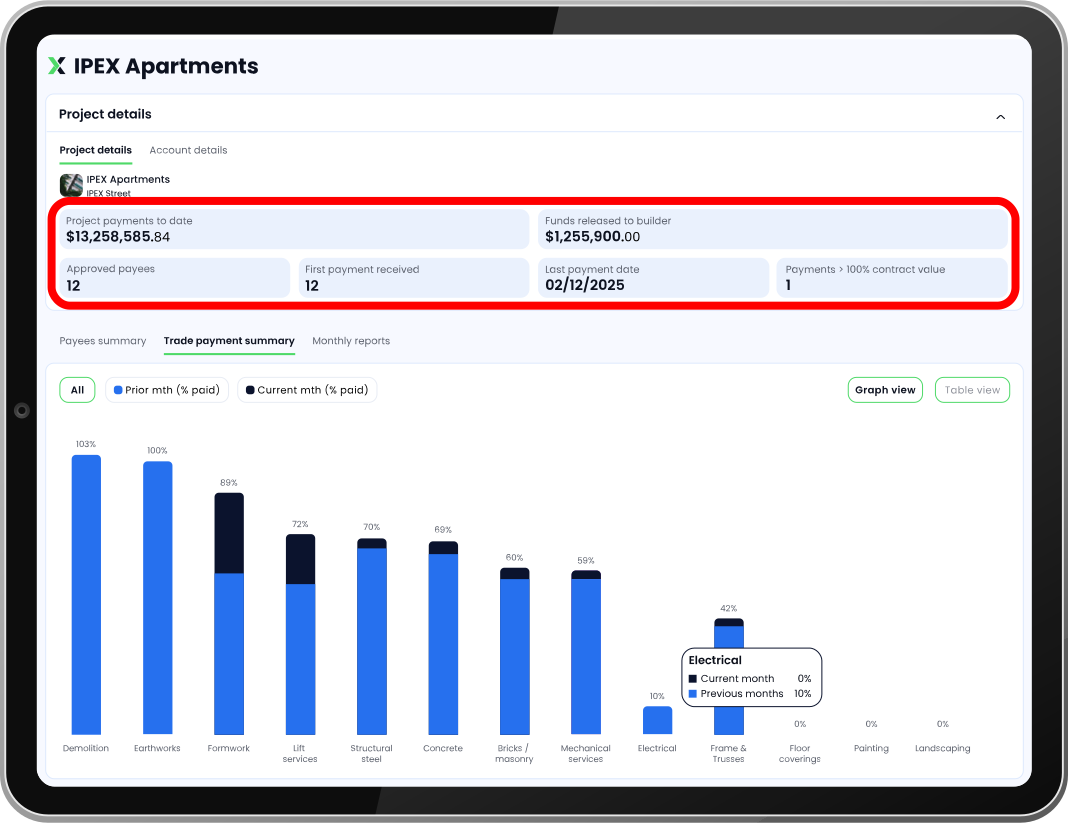
The all new IPEX developer/lender portal January 22, 2026 IPEX developer/lender portal New look, new features – includes a sneak peek at the next wave of upgrades New landing page view: Quick glance project overview now includes a progress bar (deposits against contract value) Search by project name, address or key stakeholder to find the project you’re looking for quickly Click the info icon to view key project metrics: Total of all Developer/Lender deposits made to date Date of last payment made to approved payees # Payees that have been paid more than 100% of builder-entered contract value # of overdue invoices lodged by subcontractors for the project Export feature Add a custom trade breakdown for your project Ensure IPEX reporting matches your QS assessment with custom trade breakdowns Upload defined trade breakdowns into IPEX at the start of your project Limit the builders’ options for trade selection when uploading subcontractors & suppliers to IPEX Assists cross-checking of IPEX payment data against your QS assessment IPEX developer/lender portal: Standard view Key project metrics are now tracked so you can monitor: Total progress payments to date Total of any funds approved for release to the builder & Number of subcontractors paid >100% of contract value IPEX developer/lender portal: Payment verification IPEX payee summary: Table view Track payments made to individual companies via the ‘Payees Summary’ or switch to a trade-based breakdown. IPEX trade summary: Graph view Under the ‘Trade Payment Summary’, payments made to all payees engaged on a single trade are combined & tracked against the combined contract value. This makes comparison with your QS assessment much easier. Trade payments summary show % of Contract paid to date against each trade package. View which trades received funds in the previous month for easy comparison to the previous QS assessment. IPEX trade summary: Table view IPEX developer/lender portal: Dark mode You can also switch to ‘Dark mode’ for a completely different look. IPEX developer/lender portal: Open book view Open Book view now provides running tallies of key project numbers. View total progress payments made to date & how these funds have been distributed including: Funds released to the builder & any amounts still available to be withdrawn by the builder Total of all funds paid to subcontractors & suppliers. IPEX developer/lender portal: Future upgrades Stay tuned for our next wave of upgrades: Option to create & save preferences for viewing payment data Ability to tag & track individual payees with notifications when payments are made ‘Project Position’ report: track cashflow forecasts against actual payment data for greater insight into your project More to come… Post navigation PreviousNext